
CT and MRI labels for research
Give imaging researchers a 3D workspace for labelling, second-reader review and datasets they can identify in their methods.
Video still: Pexels, Pexels License (opens in a new tab), graded and one area blurred. Sources
Why it matters
Keep the reader decisions behind your dataset.
When a collaborator asks how a contour was made, show the source series, its author and the revision a second reader checked.
- LIDC-IDRI-0003, clinical chest CT: bone above 200 HU, rendered from the scan.
- A coronal plane opens the scan to the nodule.
- Axial slice, instance 64, in a lung window of −1000 to 200 HU.
- Dashed: SAM 2.1's proposal, from a recorded run outside Nitsor.
- White: the four published LIDC reader outlines, beside the model's dashed proposal.
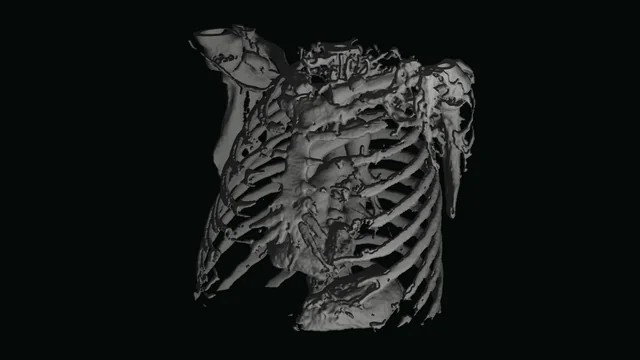
1/5LIDC-IDRI-0003, clinical chest CT: bone above 200 HU, rendered from the scan.
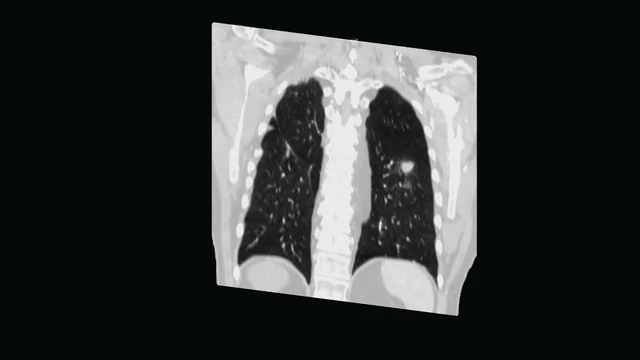
2/5A coronal plane opens the scan to the nodule.
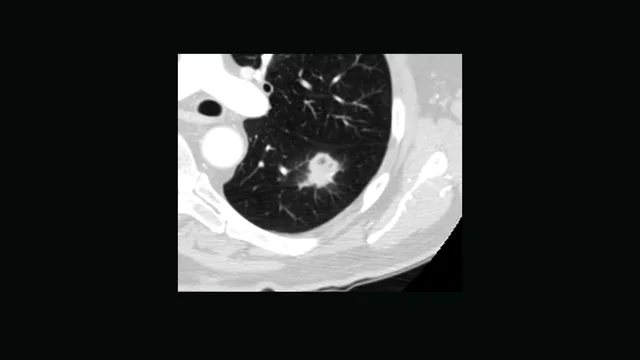
3/5Axial slice, instance 64, in a lung window of −1000 to 200 HU.
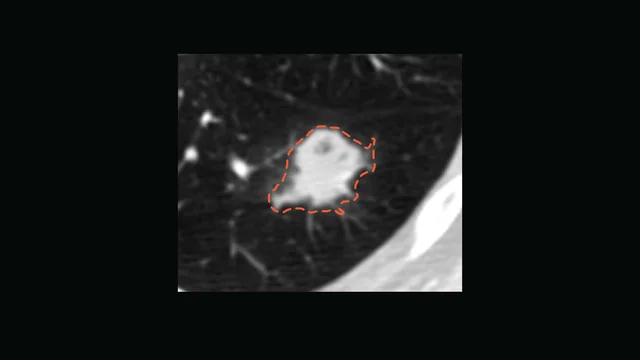
4/5Dashed: SAM 2.1's proposal, from a recorded run outside Nitsor.
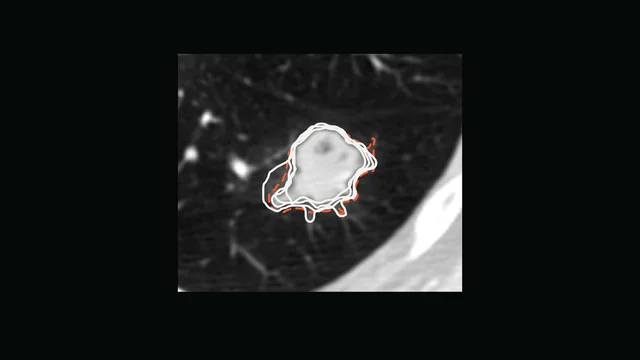
5/5White: the four published LIDC reader outlines, beside the model's dashed proposal.


Real chest CT and four radiologists' outlines: Armato et al., "Data From LIDC-IDRI", TCIA, CC BY 3.0 (opens in a new tab), modified (rendered, cut, windowed, outlines drawn). Model proposal from SAM 2.1, Meta AI, Apache 2.0 (opens in a new tab), run outside Nitsor.
How it works here
From a series to a version you cite.
A reader marks a structure in 3D on the series you already hold; a second reader accepts, corrects or rejects, and the disagreement stays in the record.
Register
Connect your DICOM series.
Uncompressed DICOM Part 10, registered from your own object storage. Nitsor reads each series' spacing, orientation and origin.
Label
Segment in 3D.
Brush, contour and threshold on three linked views. A model suggests contours, and a reader reviews them against the scan before accepting them.
Review
A second reader decides.
A second reader accepts, corrects or rejects the work. The review identifies the exact revision checked and preserves the disagreement. Reviewing a contour is not a clinical decision.
Pin
Pin a dataset version.
Freeze the reviewed cohort and cite it in your methods. The version keeps its scans, labels and class list while your readers keep working.
What the record holds
Keep each review with its contour.
Labels name their authors. Reviews name the reader and revision checked. Your cited dataset version stays fixed as work continues.

What each frame shows
- Step through an MRI series slice by slice
- Contour draws a closed outline on this slice
- The outline is a label in the rail
Real MRI: Fedorov et al., QIN-PROSTATE-Repeatability, TCIA, CC BY 4.0 (opens in a new tab), modified: cropped and windowed. The outline follows the published segmentation.
Contour: peripheral zone
- Series
- T2 axial, 3 mm slices
- Drawn by
- A. Rivera, reader, 12 slices
- Corrected by
- S. Okonkwo, second reader, 2 slices
- Review of
- the contour as drawn
- Cited as
- dsv_7be20d14
Worked example on public scans. Names, decisions and version IDs are examples.
Named authors and reviewers
A contour names its author. When a second reader reviews it, their decision stays with the revision they checked.
AI suggestions for reader review
Model suggestions have their own editing history. A reader reviews them before they enter the accepted labels.
One version for your methods section
Give your methods section a dataset version ID tied to the scans and label revisions used in the study.
What opens
DICOM Part 10 (uncompressed) for CT and MRI series.
Worked example
Published labels, as they were drawn.
A lumbar spine MRI with every vertebra and disc as its own published mask and each disc's published grade, and one chest CT nodule as four radiologists outlined it.

Lumbar spine MRI, sagittal T2: published instance masks
- Disc 206
- Pfirrmann grade 3
- Disc 205
- Pfirrmann grade 3
- Disc 204
- Pfirrmann grade 4
- Disc 203
- Pfirrmann grade 4
- Disc 202
- Pfirrmann grade 3
- Disc 201
- Pfirrmann grade 4
Vertebrae are numbered 1 to 6 from the lowest and discs 201 to 206. Grades are as published for each disc.
Real MRI, masks and grades: SPIDER, van der Graaf et al., CC BY 4.0 (opens in a new tab), modified (one slice resampled and cropped, masks drawn as outlines).

LIDC-IDRI-0003, one nodule: four radiologists' outlines
- Readers
- 4
- Texture, 1 to 5
- 3 · 5 · 4 · 4
- Spiculation, 1 to 5
- 2 · 2 · 3 · 5
- Longest diameter
- 31.7 mm, derived
Grey shows how many of the four readers include each pixel. The diameter is derived from the region at least two include.
Real chest CT and reader outlines: Armato et al., "Data From LIDC-IDRI", TCIA, CC BY 3.0 (opens in a new tab), modified (cropped, windowed, outlines drawn, agreement and diameter derived).
- Can two readers work on one study?
- Yes. One reader labels the study and a second reviews it. Nitsor records both people's work against the revisions they saw.
- How is disagreement settled?
- A reviewer accepts, corrects or rejects, and a rejection stays readable with its author. Rejected work can be sent back with the reviewer's note, and corrections follow the configured workflow.
- Does Nitsor prevent patient overlap between splits?
- Your team checks patient overlap and defines the splits. Separate dataset versions preserve those selections. They do not establish that the splits are independent.
- Do our images leave our storage?
- Series are registered from your bucket and stay there. The browser reads viewed slices from it through short-lived signed links, and model jobs work on temporary copies while they run. Nitsor keeps file locations, checksums, geometry and labels.
- Who can see a series?
- People you add to its project. A member opens no project until someone grants access, and each grant is read, contribute, operate or admin. Workspace owners and admins see every project.
- How do our readers sign in?
- On Team, with email and password, Google or Microsoft. On Enterprise, through single sign-on with your SAML or OIDC identity provider. On Community, through your own OIDC identity provider.
- Can we show who changed a label, and when?
- Yes. Each contour keeps its author, each review names the reader and the revision checked, and the history is only ever added to. A monitor can have read-only access at no charge per person.
- Who de-identifies the images?
- Your team does, before registering a series. Nitsor has no de-identification step: it reads each series in your storage as it is.
- Does it register series to each other?
- No. Here, registration means connecting a series to Nitsor; it does not align images. Each series keeps its own grid, and a label stays on the grid it was drawn on.
- Does it connect to our archive?
- Nitsor reads DICOM from S3-compatible storage. Export studies from your archive to a bucket and register them there.
For research and AI development. Nitsor is not a medical device, and nothing in it supports a diagnosis or a patient-care decision.
Working with uncompressed single-frame DICOM ultrasound images?
Label and review uncompressed single-frame DICOM ultrasound images. Calibration stays with the image; images without spatial geometry remain individual images.
Explore ultrasound researchStart with one study.
Use a public CT or MRI series to see labelling, second-reader review and a fixed dataset version in one workflow.